How to Build the Best Chatbot in 2026 (No BS Guide)
The Stack That Works
Core: Gemini 2.5 Flash + Pinecone vector store + n8n backend + Next.js frontend.
That's the stack. You need a vector database, a fast LLM, an automation backend, and a frontend that doesn't suck.
The Two RAG Approaches Worth Knowing
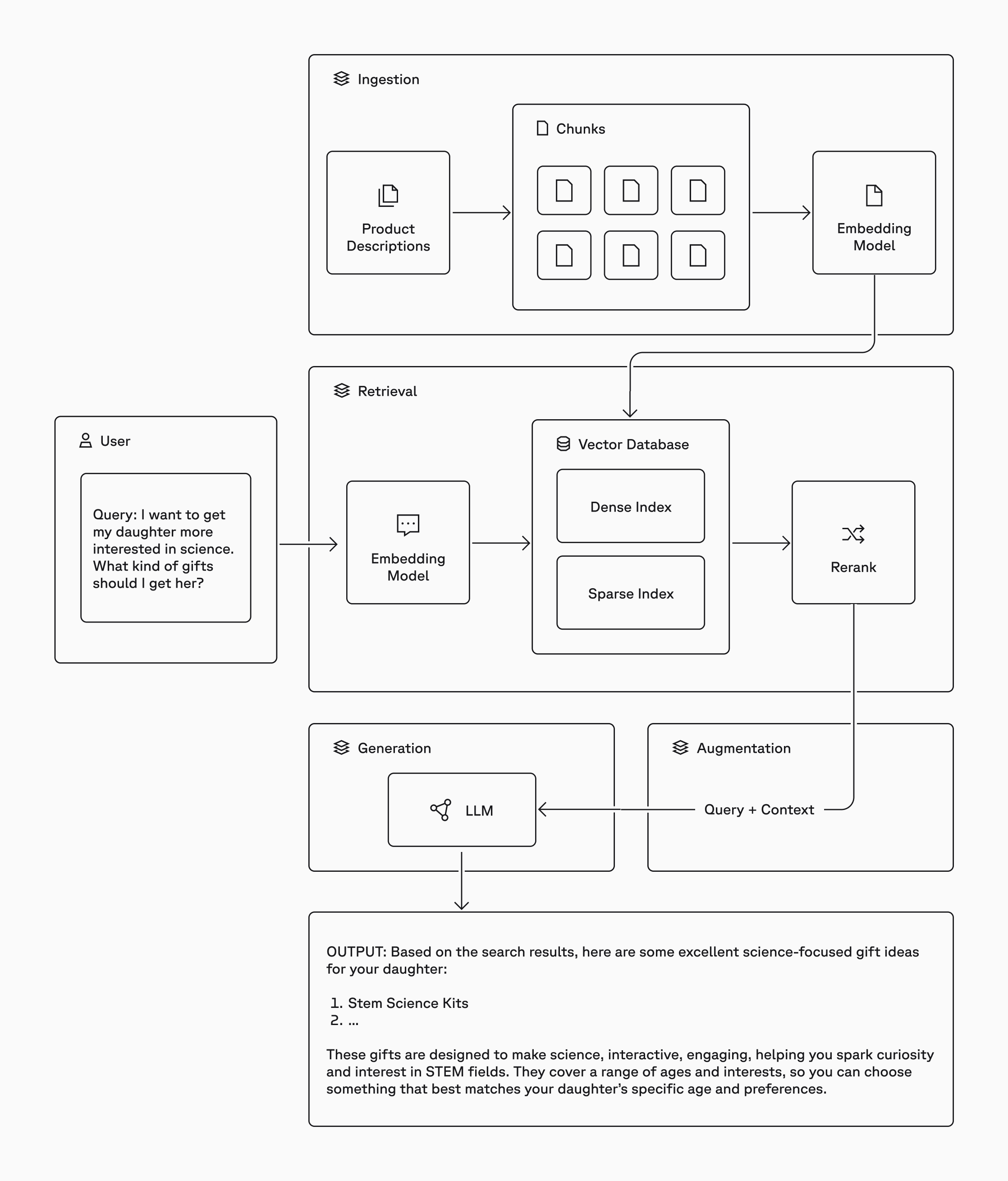
Approach 1: Pinecone + LLM (The Classic)
Pinecone is a managed vector database. You chunk your documents, generate embeddings (use Gemini Embedding 2 for this), and store the vectors. At query time, your chatbot embeds the user's question, searches Pinecone for relevant chunks, and passes them as context to the LLM.
This is textbook RAG (Retrieval Augmented Generation). Your chatbot doesn't hallucinate because it's pulling from your actual data.
Two LLMs worth considering here:
- GPT-4.1 Mini is cheap, capable, and handles tool calls well
- Gemini 2.5 Flash has faster response times and is noticeably snappier
Approach 2: Gemini FileSearch (Built-in RAG, No Pinecone)
This is the one most people don't know about. Gemini's FileSearch API is a fully managed vector store built into the Gemini API. You upload your documents, Google handles the chunking, embedding, and retrieval automatically.
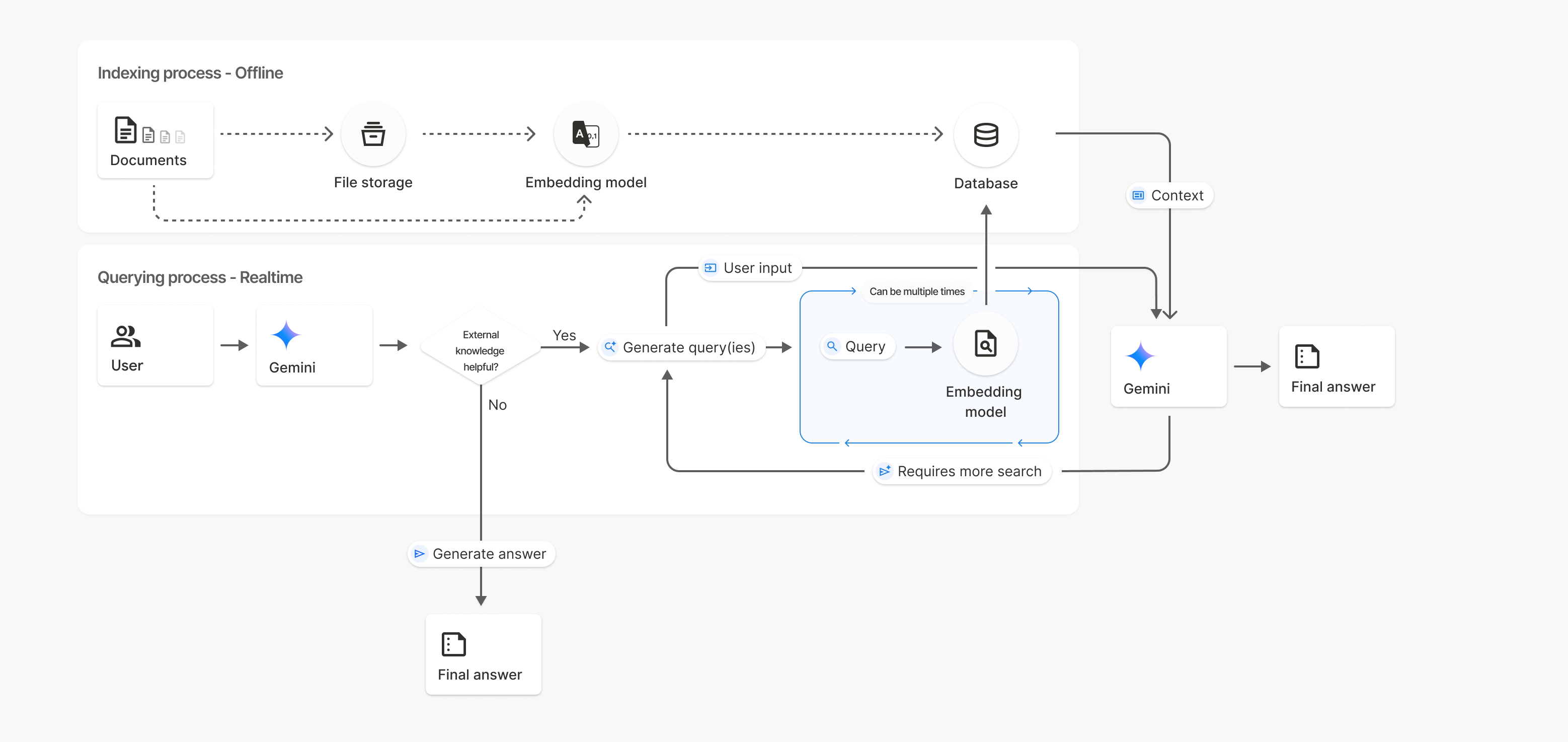
No Pinecone. No embedding API calls. No index management. You upload a text file and the API does the rest. The retrieval happens inside the Gemini call itself. It's one API request that does both RAG and generation.
You can also build an overwrite endpoint so n8n can scrape the website, build the knowledge base text, and push it to Gemini's store on a schedule. Full sync, zero manual work.
Latency: GPT-4.1 Mini vs Gemini 2.5 Flash
Here's what the benchmarks show:
Gemini 2.5 Flash is faster than GPT-4.1 Mini. Using Gemini 2.5 Flash with Pinecone vector store gives you response times that are noticeably snappier. Fractions of a second faster than 4.1 Mini with the same Pinecone setup.
Using Gemini 2.5 Flash with its built-in FileSearch is even faster because there's no separate embedding call and no Pinecone round-trip. The retrieval happens inside the same API call as generation.
| Setup | Relative Speed |
|---|---|
| GPT-4.1 Mini + Pinecone | Baseline |
| Gemini 2.5 Flash + Pinecone | Faster |
| Gemini 2.5 Flash + FileSearch | Fastest (one API call does everything) |
Pinecone vs Gemini FileSearch: When to Use What
This is the decision that will save or waste your time.
Use Pinecone When:
- You have private data and want full control over your embeddings and index
- You're using n8n because Pinecone has native, default nodes. Drag, drop, done. No code needed.
- You want to use any LLM (OpenAI, Gemini, Claude, Llama) since Pinecone doesn't lock you in
- You want deterministic retrieval where the same question returns the same source documents every time
- You need the Question and Answer Chain in n8n with a Vector Store Retriever
Use Gemini FileSearch When:
- You want the simplest possible setup where you upload docs, call the API, and you're done
- You're already using Gemini as your LLM and want everything in one ecosystem
- You want the fastest latency with one API call handling retrieval + generation
- You're writing custom code (Next.js API routes, Python scripts) rather than relying on n8n's drag-and-drop nodes
- You don't need fine-grained control over chunk size, overlap, or embedding model
Using Gemini FileSearch in n8n? Here's the catch:
There are no default n8n nodes for Gemini FileSearch. If you want to use it in n8n, you need to use HTTP Request nodes or Code nodes to call the Gemini API directly. That means writing the API calls yourself. Pinecone, on the other hand, has native n8n support where you can build the entire RAG pipeline without writing a single line of code.The blunt truth: If you're building in n8n, use Pinecone. If you're writing code (Next.js, Python, etc.), Gemini FileSearch is simpler and faster.
How to Actually Optimize Latency
Nobody talks about this enough. Your chatbot can be the smartest thing on the planet. If it takes 5 seconds to respond, users will close the tab.
1. Fix Your System Prompt First
This is the single biggest lever you have. Every token in your system prompt costs you time.
- Use fewer tokens. Cut the fluff. If a rule doesn't change the output, delete it.
- Use fewer rules. 5 clear rules beat 20 vague ones.
- Be direct.
"Answer in 2 sentences max"beats"Please try to keep your responses concise and to the point while maintaining helpfulness."
Consider running a two-prompt strategy: a lean streaming prompt (~200 tokens, plain markdown output for fast first-token) and a structured prompt (full rules, JSON output for API consumers). The streaming prompt is what users see, and it's fast because it's small.
2. Stop Using the AI Agent Node in n8n
It looks cool. Here's what it actually does: it asks the LLM whether to use a tool (like Pinecone). That's an extra LLM call before the real work starts. Wasted latency.
Use the Question and Answer Chain instead. It goes straight to retrieval, grabs the context, and sends it to the LLM. No deliberation.

The AI Agent Node makes 2 LLM calls (decide tool, then answer). The Q&A Chain makes 1 (direct retrieval, then answer). This is covered in the n8n Q&A Chain docs and the difference is real.
3. Stream Your Responses
Don't wait for the full answer. Use Server-Sent Events (SSE) to stream chunks to the frontend as they're generated. The user sees the first word in milliseconds instead of waiting 2-3 seconds for the complete response.
Use the Gemini streamGenerateContent endpoint and parse the chunked JSON response in real time. The client opens a persistent HTTP connection and receives tokens as they are generated, creating that smooth typing effect users expect from modern chatbots.
4. Async Classification
After the bot responds, run a separate classification call (confidence score, escalation detection, topic categorization) after the user already has their answer. The user doesn't wait for analytics. They get their answer via stream, then the metadata is computed and logged in the background.
How to Add the Chatbot to Your Website
You built it. Now ship it. Two approaches:
Option 1: Single Hosted Script (<script> Tag), Recommended
Host the chat widget JavaScript file on your server or CDN. The client adds one line of code to their site.
What it does automatically:
- Creates a floating chat button (bottom-right corner)
- Opens a chat panel with an iframe pointing to your chatbot
- Handles session persistence across page navigations
- Supports traffic control (bucket-based percentage rollout)
- Has a kill switch to disable the widget instantly via a config endpoint without redeploying
Why this is the best option:
- One line of code so any client can do it
- Automatic updates where you update the JS file and every website gets the change instantly
- Self-contained with HTML, CSS, and JS all bundled in one script
- Reusable so you can deploy across multiple clients and pages
The tradeoff: You need to host the JS file somewhere (Vercel, S3, any CDN). If your server is down, the widget is down.
Option 2: Embedded Component (Direct Integration)
Copy-paste the React components directly into the client's page.
When to use this:
- No external hosting available
- Client wants full control over styling and behavior
- Single deployment, no need for cross-site reuse
The tradeoff: Manual updates, CSS/JS conflict risk, more effort for the client.
Recommendation: Go with Option 1 for 90% of cases.
The Full Architecture

The architecture splits into two paths:
Path 1: Streaming (Fast)
The website loads your chat widget via a script tag. The widget opens an iframe pointing to your Next.js chatbot frontend. When a user sends a message, it hits your /api/gemini-chat endpoint which streams responses using Gemini 2.5 Flash + FileSearch (built-in RAG). After the user gets their answer, an async classification call fires to an n8n webhook, which logs everything to Supabase.
Path 2: n8n Backend (No-Code)
A webhook receives the user question. A working hours check runs via a Code node. Then the Q&A Chain takes over with Gemini Chat Model + Pinecone Vector Store + Gemini Embeddings. The response is parsed, logged to Supabase, and sent back.
Two backends, same chatbot. The streaming Gemini FileSearch path is faster. The n8n Pinecone path is easier to modify without code.
TL;DR: The Cheat Sheet
- Fastest setup: Gemini 2.5 Flash + Gemini FileSearch (one API call, no vector DB)
- Most flexible: Pinecone + any LLM + n8n (native nodes, no code)
- n8n users: Pinecone has default nodes. Gemini FileSearch requires HTTP/Code nodes.
- Latency: Gemini 2.5 Flash > GPT-4.1 Mini. Stream your responses. Shrink your system prompt.
- n8n tip: Use Q&A Chain, not AI Agent node. One LLM call beats two.
- Deploy: Hosted
<script>tag with iframe. One line, auto-updates, traffic control built in.
Want This Built?
These patterns come from real client projects. If you need a production RAG chatbot built for your business, see the automation work I've shipped or get in touch directly.
Links & Resources
- Gemini API Docs
- Gemini FileSearch (Built-in RAG)
- Gemini 2.5 Flash Model
- Google GenAI SDK (@google/genai)
- Pinecone
- n8n (Workflow Automation)
- n8n Pinecone Node Docs
- n8n Q&A Chain Node Docs
- Next.js
- Supabase
- Vercel (Hosting)
- Server-Sent Events (MDN)
- OpenAI GPT-4.1 Mini
Production-tested. Not theoretical. This is what actually works.
Want to work together?
I help businesses build AI automation solutions that deliver real results.
Get in Touch